

Your SSP Is Your Organization’s
Security Story.
It’s Your Security Program on Paper.
A field guide to writing implementation statements that actually hold up under assessment.
If your cybersecurity program had a pulse, the System Security Plan would be it. Without it, your organization cannot begin a CMMC Level 2 assessment. With a weak one, your assessment will be longer, harder, and more expensive than it has to be.
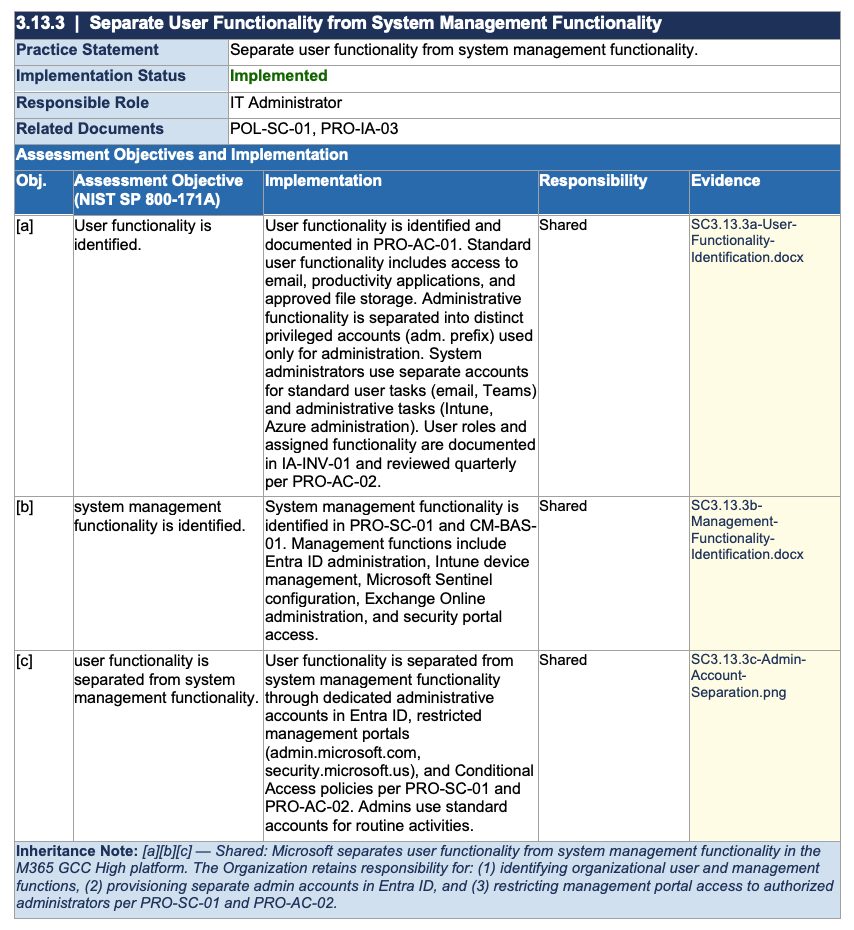
This example reflects the structure and level of detail included in the
CMMC Compliance Engine System Security Plan templates.
The SSP is the first document assessors ask for and the first impression your organization makes. A good one sets the tone for the entire assessment. A bad one makes everyone’s experience needlessly difficult, and in the post-CMMC world of False Claims Act exposure, an inaccurate or dishonest SSP can cost you millions.
This is a practical guide to writing an SSP that tells your security story honestly, holds up to scrutiny, and makes the assessment efficient and predictable.
What the SSP Actually Is
Think of your SSP as the foundation for every assessment conversation. It should describe how your environment is built, how your controls are implemented, and how CUI is protected. It should reflect the real state of your program, not an ideal version of it.
Assessors use your SSP to understand your system before asking a single question. They will refer to it constantly to confirm your scope, identify who they need to talk to, find evidence sources for each control, and check whether what is written matches what they see in the environment.
If your assessor has to guess how something works, your SSP failed to explain it.
It also reflects how your team thinks about risk, accountability, and continuous improvement. If you claim something is implemented but cannot show it, that is a problem.
What It Needs to Cover
For CMMC Level 2, the SSP must explain how you meet all 110 security controls from NIST SP 800-171. That means showing how each control satisfies the 320 assessment objectives in NIST SP 800-171r2. Those objectives are what assessors use to confirm controls actually exist and function as intended.
“Implemented” is not an explanation. Neither is “we have firewalls.” Both statements tell assessors nothing about how controls are actually enforced. If you write either of these phrases, you have created a gap, not filled one.
Each implementation statement should describe five things:
The role or team accountable for implementing and maintaining this control.
The specific technology, policy, or process enforcing the requirement.
How often the control operates, or what trigger activates it.
The tools, configurations, and verification methods proving the control works.
How the control is logged, reviewed, and tracked over time.
You also need a clear description of exactly what is in scope for CUI: systems, networks, users, locations, and explicit calls for what is out of scope with justification. Describe system boundaries, data flows, and interconnections so a reasonably informed outsider can follow how CUI moves and where it is protected.
How to Write Good Implementation Statements
The hardest part of a strong SSP is writing implementation statements that are both specific and honest. Here is the framework that works.
Write for assessors, not engineers
Use plain language that non-technical assessors and lawyers can follow. Avoid product jargon and configurations unless you also explain them in business terms. The goal is clarity, not technical depth for its own sake.
Align tightly to 800-171 and 800-171A
Structure the SSP around the 110 controls and explicitly cover the 320 assessment objectives. For every requirement, describe the real implementation, indicate status (implemented / partially implemented / planned / inherited), and note any residual risk or reliance on compensating controls.
Reflect reality, including gaps
Avoid aspirational statements. The SSP must match what is actually deployed, not what is on a roadmap. Where practices are not fully met, be explicit and tie them to POA&Ms with owners, milestones, and target dates. Hand-waving gaps is how organizations end up with False Claims Act exposure.
Document shared responsibility properly
If you are operating on a cloud platform like M365 GCC High, your SSP needs to be clear about which controls Microsoft satisfies (via FedRAMP authorization), which the organization owns entirely, and which are shared. Every inheritance note should name the platform and explain what the organization is still on the hook for. “Microsoft handles it” is not a complete inheritance statement.
Make traceability obvious
Include evidence references for each control — policy names, ticket queues, log sources, screenshot filenames, system names, or repo paths — rather than embedding raw evidence in the SSP itself. Your goal is a clean chain from requirement → implementation → evidence, with no guesswork required.
Real Example: 3.13.3 in Practice
This is what a complete, assessor-ready implementation table looks like for practice 3.13.3 — Separate User Functionality from System Management Functionality — in an M365 GCC High environment. Note how each assessment objective gets its own implementation statement, responsibility assignment, and evidence pointer.
| 3.13.3 | Separate User Functionality from System Management Functionality | ||||
| Practice Statement | Separate user functionality from system management functionality. | |||
| Implementation Status | Implemented | |||
| Responsible Role | IT Administrator / ISSO | |||
| Related Documents | POL-SC-01, PRO-SC-01, PRO-AC-02, PRO-IA-03 | |||
| Obj. | Assessment Objective (NIST SP 800-171A) | Implementation | Responsibility | Evidence |
| [a] | User functionality is identified. | User functionality is identified and documented in PRO-AC-01. Standard user functionality includes access to email, productivity applications, and approved file storage. Administrative functionality is separated into distinct privileged accounts (adm. prefix) used only for administration. System administrators use separate accounts for standard user tasks (email, Teams) and administrative tasks (Intune, Azure administration). User roles and assigned functionality are documented in IA-INV-01 and reviewed quarterly per PRO-AC-02. | Shared | SC3.13.3a-User-Functionality-Identification.docx |
| [b] | System management functionality is identified. | System management functionality is identified in PRO-SC-01 and CM-BAS-01. Management functions include Entra ID administration, Intune device management, Microsoft Sentinel configuration, Exchange Online administration, and security portal access. Each management function is mapped to a privileged role in the RBAC matrix and restricted to dedicated admin accounts via Conditional Access policy. | Shared | SC3.13.3b-Management-Functionality-Identification.docx |
| [c] | User functionality is separated from system management functionality. | User functionality is separated from system management functionality through dedicated administrative accounts in Entra ID, restricted management portals (admin.microsoft.us, security.microsoft.us), and Conditional Access policies per PRO-SC-01 and PRO-AC-02. Admins use standard accounts for routine activities. Privileged role activations require JIT elevation via Entra PIM with MFA re-authentication and business justification per PRO-IA-03. | Shared | SC3.13.3c-Admin-Account-Separation.png |
| Inheritance Note: [a][b][c] — Shared: Microsoft GCC High (FR1916871895) separates user functionality from system management functionality in the M365 platform. The Organization retains responsibility for: (1) identifying organizational user and management functions, (2) provisioning separate admin accounts in Entra ID, and (3) restricting management portal access to authorized administrators per PRO-SC-01 and PRO-AC-02. | ||||
Notice what this table does well. Every objective has its own implementation statement rather than one paragraph covering all three. The statements name specific tools (Entra PIM, Intune, Conditional Access) and reference specific policy documents. Responsibility is clearly assigned as Customer or Shared. The inheritance note explains precisely what Microsoft provides and what the organization still owns. An assessor could read this and immediately know what to look for, who to talk to, and where evidence lives.
Compare that to what an assessor typically sees in weak SSPs: a single statement saying “we use separate admin accounts” with no policy reference, no tool name, no evidence pointer, and no inheritance note. That statement fails the moment an assessor asks “show me.”
For control 3.1.2, which limits system access to specific transactions and functions, a strong SSP includes the access control policy defining permissions, the tools enforcing access (Entra ID RBAC, SharePoint site permissions, Teams membership, Exchange delegation), the approval and review process, and audit logs or reports proving the control operates as intended. An assessor should be able to move from control to implementation to evidence without guessing where anything lives.
Red Flags That Slow Down (or Stop) an Assessment
Assessors have a sixth sense for weak documentation. Here is what immediately raises questions:
- Generic Language“We use strong passwords” or “we use firewalls” tells assessors nothing about how controls are actually enforced.
- Copy-Paste DocumentationGeneric text that does not match your actual environment is obvious and fails quickly.
- Future-State ImplementationsPlanned controls do not count. Only implemented controls pass.
- Missing Asset Scope AlignmentIf inventory, diagrams, and SSP disagree, assessors assume nothing is reliable.
- No Evidence PathControls described with no way to prove them are considered unimplemented.
- Inconsistent BoundariesDifferent documents defining scope differently creates immediate doubt about everything.
- Policy Without EnforcementA written rule that is not technically enforced does not meet requirements.
- Ownership Not DefinedIf nobody owns a control, nobody maintains it — and assessors know it.
- Outdated DocumentationAn SSP describing last year’s environment fails this year’s assessment.
- Nine-Page SSPThere is no official minimum, but assessors know nine pages cannot cover 110 controls and 320 objectives.
Your SSP should be detailed enough that someone outside your organization can understand how your security operates without needing interviews to fill in the blanks. Concise is good. Incomplete is not.
Control-to-Evidence Mapping
One of the fastest ways to frustrate assessors is making them hunt for evidence. Your SSP should clearly show where proof for each control lives. Don’t embed the evidence itself, but point directly to it.
A good SSP lets an assessor move from requirement to implementation to evidence without guesswork. For every control, your SSP should point to:
The document that defines the requirement and assigns ownership.
The specific tool or setting enforcing the control.
The role managing it and the review cadence.
The log, screenshot, report, or record that proves it works.
Typical evidence sources include configuration screenshots or exports, audit logs, access review records, change tickets or approval records, training records, risk assessments or scan reports, and backup or monitoring reports. Your goal is traceability, not volume. An assessor who can quickly see where evidence comes from needs far less time to validate your controls.
Pre-Assessment Readiness Checklist
Before scheduling your assessment, review your SSP like your reputation depends on it, because it does. Confirm it can answer yes to all of these:
- All 110 controls and their Assessment Objectives are addressed
- Implementation statements reflect reality, not plans
- System boundaries and enclaves are clearly defined
- Network and data flow diagrams match the actual environment
- Asset inventory is complete and categorized
- Roles and responsibilities are defined, with named owners per control
- Evidence sources are identified for each control
- External service providers and shared responsibilities are documented
- Cloud services and FedRAMP authorization status are documented
- Segmentation and isolation methods are explained
- Version control and document ownership are established
- All inherited and partially inherited Assessment Objectives are documented — with who they’re inherited from
- Leadership has signed off on the SSP
If several boxes are unchecked, your assessment will expose those gaps and you will pay for them in time, cost, and findings.
How Assessors Actually Use Your SSP During the Assessment
Many organizations think the SSP is just paperwork needed to start an assessment. In reality, it becomes the assessor’s roadmap for everything that follows.
Before interviews begin, assessors read your SSP to understand what systems exist, where CUI lives and flows, which assets are in scope, which teams manage each control, and where evidence should come from. During interviews and walkthroughs, they constantly compare what they see to what your SSP claims.
The workflow typically looks like this:
Read the SSP to understand architecture, boundaries, and responsibilities before asking a question.
Move through controls and objectives, using the SSP to understand how each requirement is implemented.
Ask to see proof tied to what the SSP says exists: configurations, logs, tickets, reports.
Verify that systems and processes behave as described.
If diagrams, interviews, and system behavior contradict the SSP, credibility drops quickly.
Documentation, system configurations, and operational practices should all align and tell the same story.
Assessors do not only evaluate diagrams or inventories. They evaluate how well an organization can describe its environment, its boundaries, and its protection of CUI in a consistent and defensible way. That description lives in one document.
A weak SSP forces assessors to dig, verify, and question everything, which takes longer and costs more. Most organizations that struggle are not missing technology. They are missing clarity, ownership, and documentation.
If you’re building or refining your System Security Plan, focus on clarity, accuracy, and alignment with your actual environment.
That is what assessors are looking for.
If you need a starting point, the templates and examples included in the
CMMC Compliance Engine are designed to reflect how assessors evaluate real implementations.